
Java Collections Framework (JCF)
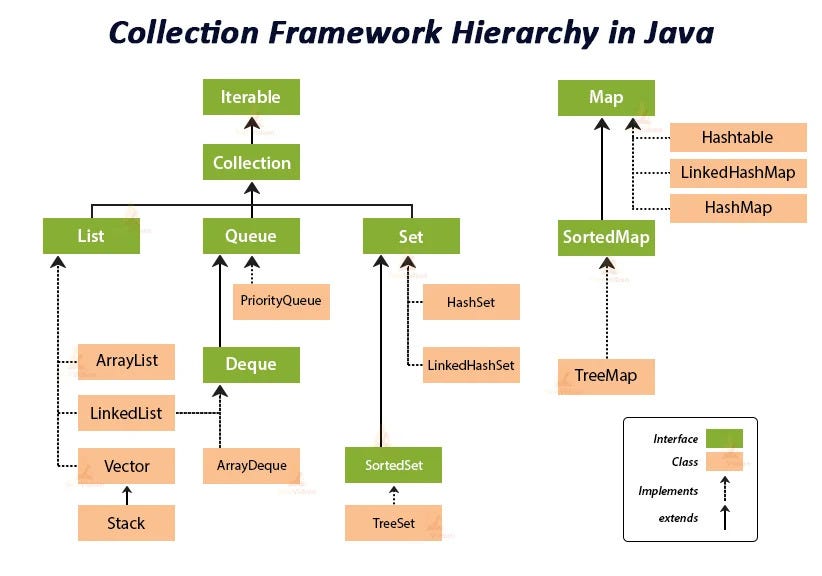
The Java Collections Framework (JCF) is a set of interfaces and classes in Java that provide a comprehensive, standardized architecture for representing and manipulating collections of objects.
It is composed of core interfaces (such as Collection, List, Set, Map, and Queue) that you can implement to create your own data structures, and it also contains concrete implementations of those interfaces (such as ArrayList, LinkedList, HashSet, HashMap).
JCF helps in simplifying the task of designing complex programs by helping developers apply OO concepts such as Polymorphism, Inheritance and Interfaces to create their own designs by reusing classes from this framework.
Let’s see an overview of the core interfaces
-
Collection (interface) The root interface in the Java Collections Framework hierarchy. Represents a group of objects known as elements. Core methods include
add,remove,contains,size,isEmpty, anditerator. -
List (interface) Represents an ordered sequence of elements where duplicates are allowed. Core implementations include
ArrayList,LinkedList, andVector. -
Set (interface) Represents a collection of *unique elements with no duplicate elements (sets can be ordered or unordered). Core implementations include
HashSet,LinkedHashSet, andTreeSet. -
Map (interface) Represents a mapping between keys and values, where each key is associated with exactly one value. Core implementations include
HashMap,LinkedHashMap,TreeMap, andHashtable. -
Queue (interface) Represents a collection designed for holding elements prior to processing. Core implementations include
LinkedList(it is also a Queue), andPriorityQueue. -
Deque (interface) Represents a double-ended queue, supporting element insertion and removal at both ends. Core implementations include
ArrayDequeandLinkedList(it is also a Deque).
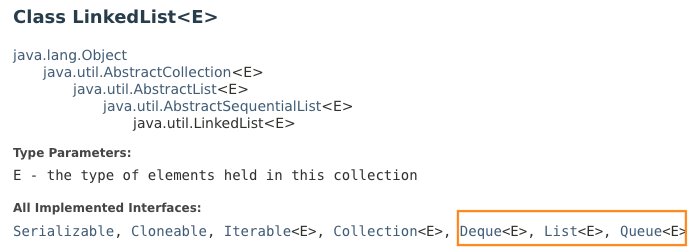
LinkedList is notable for implementing the List, Queue, and Deque interfaces, so the same class can play all three roles (though in practice ArrayList and ArrayDeque are usually preferable for performance).
The List Interface
You should be familiar with the List interface as we used ArrayList many times in SOFTENG281. ArrayList is a concrete implementation of the interface. Another important concrete implementation of List is LinkedList.
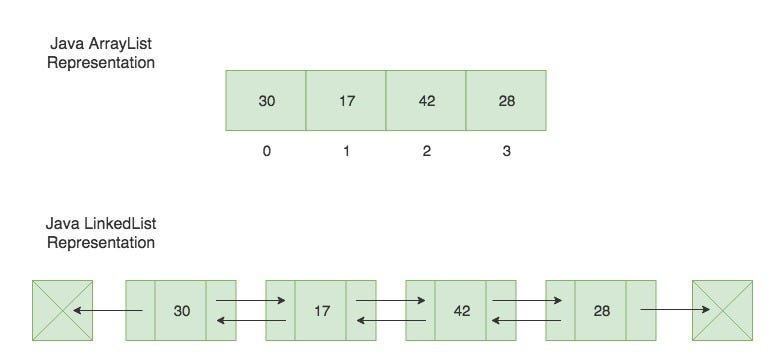
ArrayList and LinkedList have different underlying implementations and performance characteristics.
Java’s ArrayList is implemented using an array internally. The array dynamically resizes itself as needed. When the array reaches its maximum capacity, a new, larger array is allocated, and the elements from the old array are copied to the new array.
Java’s LinkedList is implemented using a doubly linked list internally. Each element is stored in a node that contains references to the previous and next nodes in the list. The first and last nodes are known as the head and tail, respectively.
Here are some pros and cons of each, along with recommendations on when to use them:
- Random Access
list.get(0); // get the element at the first position
list.set(4, "hello"); // insert hello at index 4 (i.e, position 5)
ArrayList is much faster than LinkedList because ArrayList uses an array internally, while LinkedList requires traversing the list from the beginning or end to reach the desired position.
- Memory Efficiency
Generally ArrayList is more memory-efficient than LinkedList because it only needs to store the elements inside an internal array. Conversely, each element in LinkedList requires additional memory for storing the node references.
- Better Performance for Iteration
for(String s : list){
    System.out.println(s);
}
Iterating over elements using an enhanced for loop (for-each) or using iterators is typically faster with ArrayList than LinkedList
- Insertion and Deletion
list.remove(4); // remove element at index 4
list.add("hello"); // append element at the end of the list
remove and add operations are often slower in ArrayList, because elements may need to be shifted in the internal array. Also resizing the internal array can be expensive. Conversely, LinkedList allows faster remove and add operations because only the relevant references need to be updated.
When to use ArrayList?
Use ArrayList when you need fast access to elements by index (e.g., list.get(5)), and when you frequently perform iteration over the elements (e.g., for (String s : list)), and most of the time insertion and deletion operations are infrequent or performed mainly at the end of the list.
When to use LinkedList?
Use LinkedList when you frequently perform insertion and deletion operations at arbitrary positions within the list.
Complexity summary
The table below summarises the (amortised) time complexity of the most common operations. n is the size of the list.
| Operation | ArrayList |
LinkedList |
|---|---|---|
get(i) / set(i, e) |
O(1) | O(n) |
add(e) (append) |
O(1)* | O(1) |
add(0, e) (insert at head) |
O(n) | O(1) |
add(i, e) (insert in the middle) |
O(n) | O(n) |
remove(i) (by index) |
O(n) | O(n) |
remove(Object) |
O(n) | O(n) |
contains(e) / indexOf(e) |
O(n) | O(n) |
| Iteration (for-each) | O(n) | O(n) |
* Amortised: occasionally ArrayList has to grow its internal array, which costs O(n), but on average appends are O(1).
Iterating over a collection
All collections (List, Set, …) can be traversed using the enhanced for loop or an explicit Iterator. The for-each you have been using is just syntactic sugar for an iterator:
Iterator<String> it = list.iterator();
while (it.hasNext()) {
    String s = it.next();
    System.out.println(s);
}
One important rule: you must not modify a collection while iterating it (except via it.remove()). If you do, you will get a ConcurrentModificationException.
for (String s : list) {
    if (s.equals("remove me")) {
        list.remove(s); // BOOM: ConcurrentModificationException
    }
}
To remove elements while iterating, use the iterator directly:
Iterator<String> it = list.iterator();
while (it.hasNext()) {
    if (it.next().equals("remove me")) {
        it.remove(); // safe
    }
}
The Set Interface
A Set is a collection of unique items. Thus, sets have no duplicate elements. Popular concrete implementations are HashSet and LinkedHashSet, the main difference of the two is that LinkedHashSet maintains the order of the elements as they are added inside the set, HashSet does not (i.e., it is an unordered set).
This is an example of usage of HashSet
        Set<String> hashSet = new HashSet<>();
        hashSet.add("a");
        hashSet.add("b");
        hashSet.add("b"); // Duplicate, will not be added
        hashSet.add("c");
        hashSet.add("d");
        hashSet.add("e");
        hashSet.add("f");
        System.out.println("HashSet: " + hashSet); // Output order may vary
        System.out.println("is `e` contained? " + hashSet.contains("e")); // check if the element is contained in the set
To understand how HashSet works, we need to first understand the methods hashcode and equals.
-
int hashcode()on an Object returns an integer, which should represents this Object, as uniquely as possible within the confines of an int. -
boolean equals(Object other)determines whether this Object is semantically equal to another Object.
These two methods are intrinsically linked together as equals must be consistent with hashcode: That is, a.equals(b) must imply a.hashCode() == b.hashCode(). The reverse is not true; two objects that are not equal may have the same hashcode. (this is crucial to understand hashcode)
In the following we report the Oracle Java documentation, that
defines the hashcode contract as follows:
-
Whenever it is invoked on the same object more than once during an execution of a Java application, the
hashCodemethod must consistently return the same integer, provided no information used in equals comparisons on the object is modified. This integer need not remain consistent from one execution of an application to another execution of the same application. -
If two objects are equal according to the
equalsmethod, then calling thehashCodemethod on each of the two objects must produce the same integer result. -
It is not required that if two objects are unequal according to the
equalsmethod, then calling thehashCodemethod on each of the two objects must produce distinct integer results. However, the programmer should be aware that producing distinct integer results for unequal objects may improve the performance of hash tables.
This is how HashSet works:
When you add an element to a HashSet, the hashCode() method of the element is called internally to generate the hashcode of the element. This hashcode is used to determine the index (bucket) in the underlying array where the element will be stored. HashSet will use equals to determine if the element already exists in the bucket
Why is called bucket? Because there could be semantically different objects (equals return false) that have the same hashcode (as discussed above this is possible! the opposite should not!). This situation is called a hashcode collision. Hashcode collisions are inevitable because the number of possible int values is much smaller than the number of distinct objects you can create. In Java, the int data type is a 32-bit signed integer, which means it can represent integer values in the range from -2,147,483,648 to 2,147,483,647 (inclusive), which means 4,294,967,296 possible hashcodes. However, let’s consider a simple example in which a class Point has two int fields x and y (2D positions):
public class Point{
    private int x;
    private int y;
}
There are 18,446,744,073,709,551,616 possible states for objects of type Point, with two int fields (x = 0, y = 0), (x = 1, y = 0) .... So it is mathematically impossible that all possible objects of type Point have a distinct hashcode. Try to consider more complex objects, they will have a much higher number of possible states, but there are still only 4,294,967,296 possible unique hashcodes. This is ok. This situation is called a hashcode collision. The HashSet will still work fine, it will just be slower to operate. There will be many hashcode collisions. Indeed, the hashcode is only computed and used for performance reasons; it is the equals method that has the last say in whether an object is unique or not.
For example, let’s assume that we add in the Set two different objects, but they have the same hashcode, this is how it works:
System.out.println(a.equals(b)); // false
System.out.println(a.hashCode() == b.hashCode()); // true
// let's assume that a.hashCode() == b.hashCode() == c.hashCode() == 23
hashSet.add(a); // the bucket with ID 23 is empty, HashSet puts element a in the bucket. It is 100% sure that there isn't another object in the bucket that is equal to a, because the bucket is empty
hashSet.add(b); // in the bucket with ID 23 there is already element a, HashSet needs to check if a.equals(b) is false. If so it will add b, this is the case so now the bucket contains a and b, which are different objects, they just have the same hashcode.
Clearly, the more hashcode collisions there are, the more equals checks HashSet has to do to be sure to add an object that is unique (there is no semantically equivalent object already inside the set).
Internally, HashSet is backed by a HashMap. Each bucket starts as a linked list of entries. Since Java 8, if a bucket grows beyond a threshold (8 entries) and the table is large enough, the JVM converts that bucket into a balanced (red-black) tree to keep lookups efficient even under heavy collisions.
When we want to retrieve an element from the HashSet, it computes the hashcode of the element, and it searches for the corresponding bucket. If HashSet finds the element in the bucket (by comparing using equals) it returns the element.
You might wonder, do I need to implement hashcode and equals methods? The answer is yes, if you need to, for example because you want to insert those elements in a HashSet (hashcode and equals are also needed in other situations).
Let’s do a step back. As you know, all classes in Java extends java.lang.Object by default. java.lang.Objectalready contains the following default implementations of hashcode and equals.
public boolean equals(Object obj) {
    return this == obj;
}

public int hashCode() {
    return System.identityHashCode(this);
 }
If you don’t implement the hashcode and equals by overriding these default implementations, the default implementation will be invoked when you use the HashSet. However, the resulting behaviour of HashSet will be unlikely the behaviour that you want.
For example:
import java.util.Set;
import java.util.HashSet;

class Point{
    int x;
    int y;

    public Point(int x, int y){
       this.x = x;
       this.y = y;
    }

    @Override
    public String toString() {
        return "Point [x=" + x + ", y=" + y + "]";
    }
}

public class Main {
    public static void main(String args[]) {
        Point p1 = new Point(3,4);
        Point p2 = new Point(3,4);
        Point p3 = new Point(8,7);

        System.out.println(p1.equals(p2)); // prints false
        System.out.println(p1.equals(p3)); // prints false
        System.out.println(p2.equals(p3)); // prints false
        System.out.println(p1.equals(p1)); // prints true

        System.out.println(p1.hashCode()); // 112810359
        System.out.println(p2.hashCode()); // 2124308362
        System.out.println(p3.hashCode()); // 146589023
    	System.out.println(p3.hashCode()); // 146589023

    	Set<Point> hashSet = new HashSet<>();
    	hashSet.add(p1);
    	hashSet.add(p2);
    	hashSet.add(p3);
    	System.out.println(hashSet); // prints [Point [x=8, y=7], Point [x=3, y=4], Point [x=3, y=4]]
    }
}
In the example above, I am not overriding the hashcode and equals methods so the JVM will use the default implementation of java.lang.Object
I would expect that p1 and p2 are equals, but they are not, because the default implementation of equals checks if they are exactly the same object in memory, similarly is the hascode, which is based on what the reference of the object is, not the object content.
So we need to override the hashcode and equals methods:
import java.util.Set;
import java.util.HashSet;

class Point{
    int x;
    int y;

    public Point(int x, int y){
       this.x = x;
       this.y = y;
    }

    @Override
    public String toString() {
        return "Point [x=" + x + ", y=" + y + "]";
    }

    @Override
    public int hashCode() {
        final int prime = 31;
        int result = 1;
        result = prime * result + x;
        result = prime * result + y;
        return result;
    }

    @Override
    public boolean equals(Object obj) {
        if (this == obj)
            return true;
        if (obj == null)
            return false;
        if (getClass() != obj.getClass())
            return false;
        Point other = (Point) obj;
        if (x != other.x)
            return false;
        if (y != other.y)
            return false;
        return true;
    }
}

public class Main {
    public static void main(String args[]) {
        Point p1 = new Point(3,4);
        Point p2 = new Point(3,4);
        Point p3 = new Point(8,7);

        System.out.println(p1.equals(p2)); // prints true
        System.out.println(p1.equals(p3)); // prints false
        System.out.println(p2.equals(p3)); // prints false
        System.out.println(p1.equals(p1)); // prints true

        System.out.println(p1.hashCode()); // 1058
        System.out.println(p2.hashCode()); // 1058
        System.out.println(p3.hashCode()); // 1216
    	System.out.println(p3.hashCode()); // 1216

    	Set<Point> hashSet = new HashSet<>();
    	hashSet.add(p1);
    	hashSet.add(p2);
    	hashSet.add(p3);
    	System.out.println(hashSet); // prints [Point [x=8, y=7], Point [x=3, y=4]]
    }
}
Now, p1 and p2 are equals, and they give the same hashcode. Also, the HashSet has only two elements because p1 and p2 are semantically equivalent although are different objects (they have a different memory address)
Ok, but how to implement them ? Why the hashcode is multiplied by 31 ? Using 31, which is a prime number helps to reduce the chance of collisions.
Don’t worry your IDE (VS Code) can generate them automatically :D
Right click inside the Java file
-> Source Action...
-> hashCode and equals
-> you choose the fields that you want to use for equals and hashcode (you might not want to consider all of them)
A more modern (and cleaner) idiom
Since Java 7, the java.util.Objects helper class lets you write hashCode and equals much more compactly. Both versions are equivalent — pick the one you prefer.
import java.util.Objects;

@Override
public int hashCode() {
    return Objects.hash(x, y);
}

@Override
public boolean equals(Object obj) {
    if (this == obj) return true;
    if (!(obj instanceof Point)) return false;
    Point other = (Point) obj;
    return x == other.x && y == other.y;
}
Objects.hash(...) does the prime-31 trick internally, and Objects.equals(a, b) handles the null case for you when comparing reference fields.
Warning: do not mutate keys
If you put an object into a HashSet (or use it as a key in a HashMap) and then change a field that is used by hashCode/equals, the object will end up in the wrong bucket and you will effectively “lose” it — contains will return false even though the object is still inside the set.
Point p = new Point(1, 2);
Set<Point> s = new HashSet<>();
s.add(p);
p.x = 99;            // mutating a field used by hashCode/equals
System.out.println(s.contains(p)); // false! the object is still in the set, but in the wrong bucket
Best practice: use immutable objects as set elements or map keys.
 Get your hands dirty!
you have this class
class Car{
    private String plate;
    private String country;
    private String colour;

    public Car(String plate, String country, String colour) {
        this.plate = plate;
        this.country = country;
        this.colour = colour;
    }
    @Override
    public String toString() {
        return "Car [plate=" + plate + ", country=" + country + ", colour=" + colour + "]";
    }
}
Two cars are equals if they have the same plate and country. Indeed, different countries can have cars that share the same plate. The Colour of the car is irrelevant. Implement hashcode and equals methods accordingly.
Operations on Set
When dealing with sets you might need to perform these operations
Consider two sets setA {1, 2, 3, 4} and setB = {2, 4, 6, 8}
Intersection
The intersection of these two sets is a set, that for each element e in the set, it satisfies setA.contains(e) is true AND setB.contains(e) is true
In this case, the intersection of setA and setB is {2, 4}
Union
The union of these two sets is a set, that for each element e in the set, it satisfies setA.contains(e) is true OR setB.contains(e) is true
In this case, the union of setA and setB is {1, 2, 3, 4, 6, 8}
Difference
The difference of setA and setB is a set, that for each element e in the set, it satisfies setA.contains(e) is true AND setB.contains(e) is false
In this case, the difference between setA and setB is {1, 3} and the difference between setB and setA is {6, 8}
Subsets
Consider two sets setA and setB, we say setA is a subset of setB if and only if for every element e in setA, setB.contains(e) is true.
When setA is a subset of setB and setB is a subset of setA, then it must be the case that setA.equals(setB) is true.
- A set that contains no element is a subset of any set
- A set is a subset of itself.
Power set
Consider setA = {2, 8, 1}
The power set of setA is a set, that contains all the subsets of setA.
In this case, the power set of setA is {empty set, {1}, {2}, {8}, {1,2}, {1,8}, {2,8}, {1,2,8}}
Cross product
Consider setA = {s, e} and setB = {2, 8, 1}
The cross product of setA and setB is a set of all pairs (a, b), where a is an element in setA and b is an element in setB.
In this case, the cross product of setA and setB is {(s,2), (s,8), (s,1), (e,2), (e,8), (e,1)}
Get your hands dirty!
Have a look to the official JavaDoc of Set to familiarize with the methods of the interface.
Implement the set operations using HashSet. Important methods to implement the operations are addAll, containsAll, removeAll, and retainAll.
The Map Interface
The Map data structure is together with lists and sets one of the most popular (and extremely useful) data structures. HashMap is a concrete implementation provided by the JDK that also uses hashcode to increase the performance.
HashMap stores data in <key,value> pairs, where each key is unique. It allows you to store and retrieve elements based on a key. The key is an unique identifier for accessing the value.
HashMap vs HashSet HashMap is used for storing key-value pairs, where each key is unique, while HashSet is used for storing unique elements without associated values.
You typically use HashMap when you need to associate keys with values and perform lookups based on keys. HashSet is used when you need to store a collection of unique elements.
Have a look at the JavaDoc of Map to understand the available methods.
The method to add elements in the map is put, where you specify the key and the value associated to that key.
Note that both key and value must be objects: you cannot use primitive types as generic type arguments — Map<int,String> map = new HashMap<>(); // NOT ALLOWED. This is a consequence of how Java implements generics (the compiler erases generic type parameters to Object, and primitives are not subtypes of Object). Use the corresponding wrapper class instead (Integer, Double, Boolean, etc.). Java’s autoboxing will then automatically convert primitives to/from wrappers for you:
Map<Integer, String> map = new HashMap<>();
map.put(1, "one"); // 1 (int) is autoboxed to Integer
Let’s consider our example below.
import java.util.Map;
import java.util.HashMap;

class Point{
    int x;
    int y;

    public Point(int x, int y){
       this.x = x;
       this.y = y;
    }

    @Override
    public String toString() {
        return "Point [x=" + x + ", y=" + y + "]";
    }

    @Override
    public int hashCode() {
        final int prime = 31;
        int result = 1;
        result = prime * result + x;
        result = prime * result + y;
        return result;
    }

    @Override
    public boolean equals(Object obj) {
        if (this == obj)
            return true;
        if (obj == null)
            return false;
        if (getClass() != obj.getClass())
            return false;
        Point other = (Point) obj;
        if (x != other.x)
            return false;
        if (y != other.y)
            return false;
        return true;
    }
}

public class Main {
    public static void main(String args[]) {
        Point p1 = new Point(3,4);
        Point p2 = new Point(3,4);
        Point p3 = new Point(8,7);

        Map<Point,String> map = new HashMap<>();

        map.put(p1,"hello");
    	System.out.println(map); // prints {Point [x=3, y=4]=hello}
        map.put(p2,"world");
    	System.out.println(map); // prints {Point [x=3, y=4]=world}
        map.put(p3,"!");
        System.out.println(map.get(p1)); // prints world
        System.out.println(map); // prints {Point [x=8, y=7]=!, Point [x=3, y=4]=world}
    }
}
map.put(p1,"hello"); adds the key-value pair (p1, "hello"). Internally, the map computes the hashCode of p1 to figure out which bucket the entry should go in. The key itself is still p1 (the object), not its hashcode. The map now contains one entry: {Point [x=3, y=4]=hello}
map.put(p2,"world"); adds the key-value pair (p2, "world"). Because p1.hashCode() == p2.hashCode() AND p1.equals(p2) is true, the map considers p1 and p2 to be the same key, so it replaces the existing value hello with world. The map still has one entry but with an updated value: {Point [x=3, y=4]=world}
map.put(p3,"!"); because p3 has a different hashcode and p3 is not equals to p1 (or p2), then it adds a new pair: {Point [x=8, y=7]=!, Point [x=3, y=4]=world}
System.out.println(map.get(p1)); returns world because we replaced the value hello
You can use putIfAbsent to put the value only if there is no key with the same hashcode
public class Main {
    public static void main(String args[]) {
        Point p1 = new Point(3,4);
        Point p2 = new Point(3,4);
        Point p3 = new Point(8,7);

        Map<Point,String> map = new HashMap<>();

        map.putIfAbsent(p1,"hello");
    	System.out.println(map); // prints {Point [x=3, y=4]=hello}
        map.putIfAbsent(p2,"world");
    	System.out.println(map); // prints {Point [x=3, y=4]=hello}
        map.putIfAbsent(p3,"!");
        System.out.println(map.get(p1)); // prints hello
        System.out.println(map); // prints {Point [x=8, y=7]=!, Point [x=3, y=4]=hello}
    }
}
Similarly to HashSet you should not worry about hash-collisions because the HashMap will still use equals in case of collisions. REMEMBER hash-collisions are inevitable — they are just a matter of performance. For example, let’s create a very bad hashCode function that always returns 5, so all objects will have the same hashcode! Of course, never do this in real code!
Keeping the rest of the Point class identical to the previous example, replace only the hashCode method with:
@Override
public int hashCode() {
    return 5;
}
Re-running the same putIfAbsent example produces exactly the same output as before:
map.putIfAbsent(p1,"hello");
System.out.println(map);          // {Point [x=3, y=4]=hello}
map.putIfAbsent(p2,"world");
System.out.println(map);          // {Point [x=3, y=4]=hello}
map.putIfAbsent(p3,"!");
System.out.println(map.get(p1));  // hello
System.out.println(map);          // {Point [x=8, y=7]=!, Point [x=3, y=4]=hello}
The result is the same: the HashMap works fine, it will just be very slow because all the elements end up in the same bucket (they all have the same hashcode).
Get your hands dirty!
I have a list of words, I want to print the occurrence of each word. For example:
    public static void main(String[] args) {
        // Sample list of words
        List<String> words = new ArrayList<>();
    	words.add("apple");
    	words.add("banana");
    	words.add("banana");
    	words.add("banana");
    	words.add("apple");
    	words.add("orange");
    	words.add("banana");
    	words.add("apple");
    	words.add("banana");

    }
banana appears 5 times apple appears 3 times orange appears 1 times
Can you implement this with HashMap ?
What if I ask you to implement the same without and HashMap using only ArrayList can you do that? Note that the content of the list might change overtime, you don’t know the content of the list when you write the code, it has to work for any arbitrary list of words.
Get your hands dirty!
REWIND!
Download the ACP execise 281_REWIND_hashset_hashmap
Read an inventory of items and their quantities from the file inventory.csv and store this data in a HashMap. Implement methods to add items, remove items, update quantities, and display the inventory.
Implement the following methods:
void addItem(String item, int quantity): Adds a new item with the specified quantity to the inventory. If the item already exists, update its quantity.void removeItem(String item): Removes an item from the inventory; if the item is not there, throw an exception.void getItem(String item, int quantity): Withdraw the specified quantity of an item from the inventory. If the available quantity is not enough, throw an exception. If the quantity goes to zero, remove the item.void updateQuantity(String item, int quantity): Updates the quantity of an existing item.void displayInventory(): Displays all items and their quantities.boolean hasItem(String item): Returns true if the inventory contains the specified item; otherwise, returns false.int getQuantity(String item): Returns the quantity of the specified item. If the item does not exist, throw an exception.List<String> listLowStock(int threshold): Returns a list of items whose quantity is below the given threshold.void clearInventory(): Empties the entire inventory.