
More Data Structures
Learning objectives
By the end of this lecture you should be able to:
- Choose the right linear collection (
Stack,Queue,Deque,PriorityQueue) for a given problem, and pick a sensible JDK implementation for it. - Use the two API styles of
Queue/Deque(add/remove/elementvsoffer/poll/peek) and explain when each is appropriate. - Implement an undirected graph with an adjacency map, including
addNode,addEdge,removeNode,removeEdge. - Implement BFS and DFS (both iterative and recursive) and explain the role of the queue, stack, and visited set.
- Use Java generics (classes, interfaces, bounded types, wildcards) to make data structures reusable, and explain at a high level why type erasure restricts what you can do at runtime.
Stack
A Stack is a Last In, First Out (LIFO) data structure, which means that the most recently added element is the first one to be removed. Think of it like a stack of pancakes where you can only add or remove on the top. The basic stack operations are push (add on top), pop (remove from top), and peek (see what is on top without removing it).
Heads up — don’t use
java.util.Stack. The legacyStackclass extendsVector, which is synchronized (slow) and exposes random-access methods that break the LIFO contract (you caninsertElementAtanywhere in the middle!). The official Javadoc forStackitself recommends usingDequeinstead:Deque<String> stack = new ArrayDeque<>();Prefer
ArrayDequeas your go-to stack. UseLinkedListonly if you also need list-style access.
The same example, written the recommended way:
import java.util.ArrayDeque;
import java.util.Deque;

public class Main {
    public static void main(String[] args) {
        Deque<String> stack = new ArrayDeque<>();
        stack.push("a");
        stack.push("b");
        stack.push("c");
        stack.push("d");
        System.out.println(stack); // [d, c, b, a]  (top of stack is printed first)

        // see what's on top without removing it
        System.out.println(stack.peek()); // d

        while (!stack.isEmpty()) {
            // pop removes and returns the top
            System.out.println(stack.pop()); // d c b a
        }

        System.out.println(stack); // []
    }
}
You will still see the old java.util.Stack in older codebases and in some textbooks, so it is worth recognising:
import java.util.Stack;

Stack<String> stack = new Stack<>(); // works, but avoid in new code
A concrete example on when a stack is useful is implementing the “undo” functionality of a text editor. Every time a user modifies the text, the action is pushed onto the stack. When undoing, you simply remove the last action by popping it off the stack, effectively reversing the most recent change.
 Get your hands dirty! (Difficulty: Easy)
Write a method that takes a string containing parentheses ( and ) and checks if the parentheses are balanced. For example, the function should return true for ((())) and ()()(), and false for (() and )(.
Hint
Scan the string left-to-right. Push every ( onto a stack. On every ), pop one element — if the stack is already empty, the string is unbalanced. At the end, the stack must be empty.
Queue
A Queue is a First In, First Out (FIFO) data structure, which means that the first element added is the first one to be removed. Think of it like a line of people waiting for a ticket, where the first person to join the line is the first one to get the ticket.
In Java, Queue is an interface. The two common implementations you will use are LinkedList and ArrayDeque.
import java.util.ArrayDeque;
import java.util.Queue;

public class Main {
    public static void main(String[] args) {
        Queue<String> queue = new ArrayDeque<>();
        queue.add("a");
        queue.add("b");
        queue.add("c");
        queue.add("d");
        System.out.println(queue); // [a, b, c, d]

        // get the first element without removing it
        System.out.println(queue.peek()); // a

        while (!queue.isEmpty()) {
            // remove elements from the front
            System.out.println(queue.remove()); // a b c d
        }

        System.out.println(queue); // []
    }
}
ArrayDequevsLinkedListfor a queue. Both implementQueue, butArrayDequeis usually preferred: it stores elements in a contiguous array (better cache locality, less memory per element). ChooseLinkedListonly if you also needListoperations (e.g. indexed access viaget(i)) on the same object.
The two API styles
Queue exposes two parallel sets of methods for the same operations. They differ only in how they signal failure:
| Operation | Throws on failure | Returns special value |
|---|---|---|
| Insert at tail | add(e) → IllegalStateException if full |
offer(e) → returns false |
| Remove from head | remove() → NoSuchElementException if empty |
poll() → returns null |
| Inspect head | element() → NoSuchElementException if empty |
peek() → returns null |
Use the throwing versions (add / remove / element) when an empty/full queue indicates a bug — let it crash loudly. Use the value-returning versions (offer / poll / peek) when emptiness is a normal state you want to handle (e.g. inside a while (!queue.isEmpty()) you’d still use poll for safety).
PriorityQueue
PriorityQueue is another implementation of the Queue interface, but it does not follow FIFO: instead, the element returned by poll/remove is the smallest according to either the natural ordering of the elements or a Comparator you supply. Internally it is implemented as a binary heap.
import java.util.PriorityQueue;

PriorityQueue<Integer> pq = new PriorityQueue<>();
pq.add(5);
pq.add(1);
pq.add(3);

while (!pq.isEmpty()) {
    System.out.println(pq.poll()); // 1, 3, 5
}
You can pass a Comparator to reverse the order or to prioritise custom objects:
PriorityQueue<Integer> maxHeap = new PriorityQueue<>(Comparator.reverseOrder());
A concrete example for a FIFO queue is a printer job spooler. A PriorityQueue fits anywhere you need “process the most urgent item next”, e.g. task schedulers, Dijkstra’s shortest-path algorithm, or an emergency-room triage system.
Deque
A Deque (pronounced “deck”) is a double-ended queue: it supports insertion and deletion at both ends. This makes it a hybrid of a stack and a queue — in fact, this is why we used ArrayDeque as our recommended Stack implementation earlier.
The key methods come in First / Last pairs:
addFirst(e)/addLast(e)(alsoofferFirst/offerLast)removeFirst()/removeLast()(alsopollFirst/pollLast)peekFirst()/peekLast()
The shorter names push, pop, peek all operate on the front (so push is the same as addFirst, pop is the same as removeFirst). The unqualified add and remove (inherited from Queue) operate on the back and front respectively.
import java.util.ArrayDeque;
import java.util.Deque;

public class Main {
    public static void main(String[] args) {
        Deque<String> deque = new ArrayDeque<>();

        deque.add("a");   // add to back  → [a]
        deque.push("b");  // push to front → [b, a]
        deque.add("c");   // add to back  → [b, a, c]
        deque.push("d");  // push to front → [d, b, a, c]
        System.out.println(deque); // [d, b, a, c]

        // peek at both ends (no removal)
        System.out.println(deque.peekFirst()); // d
        System.out.println(deque.peekLast());  // c

        // pop = remove from front
        System.out.println(deque.pop());    // d   → [b, a, c]
        // remove() = remove from front (same end as pop)
        System.out.println(deque.remove()); // b   → [a, c]

        System.out.println(deque); // [a, c]  (NOT empty — 2 elements remain)
    }
}
You can also use LinkedList, which implements both Deque and List:
Deque<String> deque = new LinkedList<>();
ArrayDeque has better performance than LinkedList for the typical “use both ends” workload (better cache locality, no per-node allocation). Choose LinkedList only when you also need List operations (e.g. indexed access).
A concrete example for Deque is a web browser’s navigation history with back/forward buttons. As the user navigates, URLs are added to one end; pressing back/forward moves URLs between two deques.
Choosing between Stack, Queue, Deque, and PriorityQueue
| ADT | Order | Main operations | Recommended JDK class | Typical use case |
|---|---|---|---|---|
| Stack | LIFO | push, pop, peek |
ArrayDeque (via Deque) |
Undo history, expression parsing |
| Queue | FIFO | add/offer, remove/poll, peek |
ArrayDeque or LinkedList |
Print spooler, BFS |
| Deque | Both ends | addFirst/addLast, removeFirst/removeLast |
ArrayDeque |
Browser history, sliding window |
| PriorityQueue | By priority | add/offer, poll, peek |
PriorityQueue |
Task scheduler, Dijkstra, triage |
Get your hands dirty!
Write a function that takes a string as input and checks if it’s a palindrome (reads the same forwards and backwards). Use a Deque to compare characters from both ends of the string.
Graphs
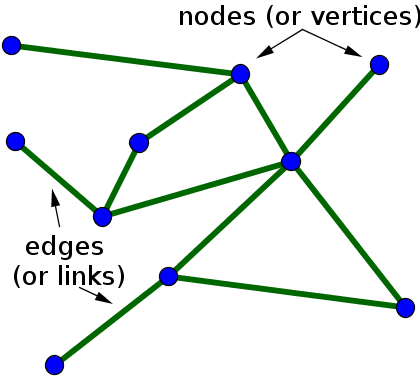
Graph is a data structure for storing connected data. A graph consists of nodes (also called vertices) and edges. A node represents the entity and an edge represents the relationship between entities. For example, you can use graphs to represent network of people on a social media platform (e.g., Facebook); nodes are the people and the edges are friendship relations. Graphs are also very useful when modeling telecommunications and transportation networks.
Does JDK have a Graph Data structure ? No Why? Graph implementations can be very different, a general Graph might not turn out to be very useful. There are many types of Graphs (directed, undirected, weighted).
There are, of course, external libraries that offer Graphs implementations. However, often it is better to have a customized Graph to better fit the intended usage, let’s implement one.
Node (Vertex)
First, you need to create your Node class. If you want to use primitive data as nodes, you can use wrapper classes (e.g., Integer, Double, and Float) to represent primitive data types as objects. However, it is often better to have a dedicated class. For example, we want to model a network of people, so we have a class Person as nodes of the Graph.
Make sure that you @Override the equals and hashcode methods as we need them to compare and find nodes in the Graph. If you don’t do that, the Graph will consider two nodes to be different as long as they are different reference in memory regardless of the content of their instance fields.
For example, let’s consider a Person class:
public class Person {
  private String id;
  private String name;
  private String lastName;

  public Person(String id, String name, String lastName) {
    this.id = id;
    this.name = name;
    this.lastName = lastName;
  }

  @Override
  public String toString() {
    return "Person [id=" + id + ", name=" + name + ", lastName=" + lastName + "]";
  }

  @Override
  public int hashCode() {
    final int prime = 31;
    int result = 1;
    result = prime * result + ((id == null) ? 0 : id.hashCode());
    return result;
  }

  @Override
  public boolean equals(Object obj) {
    if (this == obj)
      return true;
    if (obj == null)
      return false;
    if (getClass() != obj.getClass())
      return false;
    Person other = (Person) obj;
    if (id == null) {
      if (other.id != null)
        return false;
    } else if (!id.equals(other.id))
      return false;
    return true;
  }
}
Note that the only id field is used for the hashCode and equals methods. Indeed, it’s possible for multiple people to have the same combination of name and lastname.
Edges
The implementation of the edges of the Graph depends on what kind of graph we want.
Main types of Graphs are directed (the edges have a direction, the relation is not symmetric) undirected (the relation is symmetric), weighted or unweighted.
For directed and weighted graphs makes sense to have a dedicated class for edges.
class Edge {
        private Node to;
        private Node from;
        private Integer weight;
    }
This class specifies the direction of the edge and the weight of the connection. For example, the “follow” relations in X (former Twitter) is one-way relationship, because a person A can follow person B, but not vice-versa. It implies a connection from A to B but not necessarily from B to A. So, for directed graphs we need to specify the direction of the relationship. The class above uses to and from to specify the direction.
However, let’s say that we want to model the “friendship” relation of Facebook. If there is an edge between nodes A and B, it implies that there is a friendship connection from A to B and from B to A. As friendship on Facebook are mutual. In this case, we don’t need a separate class, we can keep track of the relationships using a Map.
public class Graph {
 private Map<Person, List<Person>> adjNodes;

 public Graph() {
   this.adjNodes = new HashMap<>();
 }
adjNodes maps for each node N in the Graph a list of adjacent nodes, that is the list of nodes that have a relationship with node N.
Let’s see the addNode operation:
public void addNode(Person node) {
   adjNodes.putIfAbsent(node, new ArrayList<>());
 }
The Map method putIfAbsent puts in the map a new key only if it is absent in the map. Otherwise, if we use put instead of putIfAbsent we will replace the adjacent list with an empty one. Map checks for equivalent keys (to know if a key is absent or not) using equals. As such, make sure you @Override the default implementation!
 public void addEdge(Person node1, Person node2) {
   adjNodes.get(node1).add(node2);
   adjNodes.get(node2).add(node1);
 }
addEdge adds node2 in the adjacent list of node1 and vice-versa. Note that we are assuming that the nodes are already in the Graph. Otherwise, the method will throw a NullPointerException. We can modify the method as follows to make sure that the nodes will be added in the Graph if are not there.
 public void addEdge(Person node1, Person node2) {
   addNode(node1);
   addNode(node2);
   adjNodes.get(node1).add(node2);
   adjNodes.get(node2).add(node1);
 }
For removing a node N, we need to first remove the entry in the map with N as the key. Then, we need to scan the adjNodes maps and remove N from all the list of adjacent nodes.
 public void removeNode(Person node) {
   adjNodes.remove(node);
   for (Person key : adjNodes.keySet()) {
     adjNodes.get(key).remove(node);
   }
 }
For remove an edge:
 public void removeEdge(Person node1, Person node2) {
  adjNodes.getOrDefault(node1, new ArrayList<>()).remove(node2);
   adjNodes.getOrDefault(node2, new ArrayList<>()).remove(node1);
 }
getOrDefault returns the content associated to the key or empty list new ArrayList<>() if the map does not contain that key. We need to do this otherwise we will have NullPointerException. Alternatively, we can check the content of the map before we remove the element.
 public void removeEdge(Person node1, Person node2) {
   if (adjNodes.containsKey(node1) && adjNodes.containsKey(node2) ){
	   adjNodes.get(node1).remove(node2);
	   adjNodes.get(node2).remove(node1);
   }
 }
To print the adjNodes we can do like this
 public String toString() {
   StringBuilder sb = new StringBuilder();
   for (Person n : adjNodes.keySet()) {
     sb.append(n);
     sb.append("->");
     sb.append(adjNodes.get(n));
     sb.append(System.lineSeparator());
   }
   return sb.toString();
 }
Remember that we should use a StringBuilder in this case as we should not concatenate a String inside a loop.
Get your hands dirty!
Consider the example of the Facebook Graph, implement a method that tells the person or persons that have the highest number of friends.
Graph traversal
Given a Graph, we often need to traverse the Graph to search something or to extract properties of the Graph. There are two main algorithms to traverse a graph: Breadth-First Search (BFS) and Depth-First Search (DFS)
Both of these algorithms start the search from a pre-defined node called root.
Breadth-First Search (BFS):
Starting from the root, BFS explores all the neighbor nodes at the present depth prior to moving on to nodes at the next depth level. In other words, it traverses the graph level by level.
BFS is typically used to find the shortest path between two nodes or to explore all nodes within a certain distance from the starting node.
BFS can be implemented using a queue data structure, where nodes are visited in the order they were encountered (avoiding infinite loop by making sure to visit each node only one time).
We keep two collections: a List<Node> visited for the visit order (the return value), and a Set<Node> seen for fast O(1) membership checks. If we used visited.contains(n) on the list directly, every check would be O(V), making the whole traversal O(V²) instead of O(V+E). Note that this also relies on Node having proper equals/hashCode — same reason as for the Map keys above.
public List<Node> breadthFirstTraversal(Node root) {
   List<Node> visited = new ArrayList<>();
   Set<Node> seen = new HashSet<>();
   Queue<Node> queue = new ArrayDeque<>();
   queue.add(root);
   seen.add(root);
   visited.add(root);
   while (!queue.isEmpty()) {
       Node node = queue.poll();
       for (Node n : adjNodes.get(node)) {
           if (!seen.contains(n)) {
               seen.add(n);
               visited.add(n);
               queue.add(n);
           }
       }
   }
   return visited;
 }
We use ArrayDeque (not LinkedList) as our Queue — recall the earlier note that ArrayDeque has better cache locality and lower memory overhead. For insertion we use add: ArrayDeque is unbounded so insertion can never fail, which makes the throwing-style add perfectly safe here. On the consumption side we use poll — we already guard with while (!queue.isEmpty()), but poll is the conventional safe choice in that pattern.
Depth-First Search (DFS):
Starting from the root, DFS explores as far as possible along each branch before backtracking. In other words.
DFS can be used to find cycles in a Graph: When performing DFS, if it is encountered an edge that connects a node to one of its ancestors in the DFS tree, it indicates the presence of a cycle.
DFS can be implemented using a stack data structure. As discussed in the Stack section, we use ArrayDeque rather than the legacy java.util.Stack. As with BFS, we keep a Set<Node> seen alongside List<Node> visited so that membership checks are O(1).
 public List<Node> depthFirstTraversal(Node root) {
   List<Node> visited = new ArrayList<>();
   Set<Node> seen = new HashSet<>();
   Deque<Node> stack = new ArrayDeque<>();
   stack.push(root);
   while (!stack.isEmpty()) {
     Node node = stack.pop();
     if (!seen.contains(node)) {
       seen.add(node);
       visited.add(node);
       for (Node n : adjNodes.get(node)) {
         stack.push(n);
       }
     }
   }
   return visited;
 }
Here’s a simple example to illustrate the difference between BFS and DFS:
Let’s say we have a graph represented as follows:
       A
     / | \
    B  C  D
   / \    |
  E   F   G
If we start the traversal from node A:
BFS: We would visit nodes in the order A, B, C, D, E, F, G.
DFS: We would visit nodes in the order A, B, E, F, C, D, G.
In BFS, we explore all nodes at the current depth level before moving to the next level, while in DFS, we explore as far as possible along each branch before backtracking.
Both algorithms have their own strengths and weaknesses, and the choice between them depends on the specific problem at hand and on the characteristics of the graph.
BFS is better if
- The search graph has cycles or is infinite, or
- We need the shortest path to a solution, or
- There are some solutions at shallow depth.
DFS is better if
- There are only solutions at great depth, or
- Memory is limited
You might wonder why the seen check
   if (!seen.contains(node)) {
       seen.add(node);
       visited.add(node);
is outside the inner loop for DFS but inside the inner loop for BFS.
DFS: The check is outside the inner loop, immediately after popping from the stack, because nodes are pushed onto the stack without checking if they have been visited. This ensures nodes are only processed once when they are popped.
BFS: The check is inside the inner loop, ensuring that nodes are added to the queue and marked as seen only if they haven’t been seen before, maintaining the level-order exploration of BFS.
Get your hands dirty!
Consider the example of the Facebook Graph, implement a method that returns the person(s) that have the highest number of friends. Do this with graph traversal using both algorithms: BFS and DFS. Make sure that they return the same result.
Java Generics
Until now, we have worked with examples where the type of the graph nodes is fixed. How can we create a data structure that works for any type of object? We use Java Generics!
- The key idea is to support parametric types.
- Thus, classes and interfaces operate on data types that can be changed like a parameter.
- Classes, interfaces, and methods operating on parametric types are called generic classes, interfaces, or methods.
- This allows us to define a data structure agnostic to the data types it will operate on.
- It ensures type-safe operations. Type safety ensures that expressions and assignments are done using consistent types. This ensures that what the programmer intends at compile time happens at runtime.
You have used generics before!
For example:
List<Integer> list = new ArrayList<>();
Inside <>, you specify the object type of the elements in the list. This feature is called a generic, and it allows type safety at compile time:
List<String> list = new ArrayList<>();
list.add("Hello");
list.add(123); // COMPILATION ERROR: `123` is an Integer, not a String
With generics, you can do this without needing to cast:
String message = list.get(0);
Without specifying the type, it defaults to java.lang.Object, and you need to cast:
List list = new ArrayList();
list.add("Hello");
String message = (String) list.get(0); // Explicit cast needed
While with generics:
List<String> list = new ArrayList<>();
list.add("Hello");
String message = list.get(0); // No cast needed, type is known
With generics, we can create a data structure like a graph that can be used with any type.
class Graph<T> {
    private Map<T, List<T>> adjacencyMap;

    public Graph() {
        this.adjacencyMap = new HashMap<>();
    }

    public void addNode(T node) {
        adjacencyMap.putIfAbsent(node, new ArrayList<>());
    }

    public void addEdge(T node1, T node2) {
        addNode(node1);
        addNode(node2);
        adjacencyMap.get(node1).add(node2);
        adjacencyMap.get(node2).add(node1);
    }
}
We can then create a graph of Strings, Integers, or any custom object:
Graph<String> stringGraph = new Graph<>();
We can restrict the types that can be used as type parameters with bounded type parameters using extends:
public class Graph<T extends Number> {
    // Class implementation
}
This means the graph can only be used with types that are subclasses of Number (e.g., Integer, Double).
Wildcards
Wildcards allow more flexibility when working with generic types. There are three types of wildcards:
Unbounded Wildcards (?):
public void printList(List<?> list) {
    for (Object elem : list) {
        System.out.println(elem);
    }
}
This method can accept a list of any type.
Bounded Wildcards with an Upper Bound (? extends Type):
public void processNumbers(List<? extends Number> list) {
    for (Number num : list) {
        System.out.println(num.doubleValue());
    }
}
This method can accept a list of any type that is a subclass of Number.
Bounded Wildcards with a Lower Bound (? super Type):
public void addNumbers(List<? super Integer> list) {
    list.add(10); // Can add Integer or any subclass of Integer
}
This method can accept a list of any type that is a superclass of Integer (including Integer itself).
Generic Interfaces
Interfaces can also use generic:
public interface Pair<K, V> {
    public K getKey();
    public V getValue();
}
public class OrderedPair<K, V> implements Pair<K, V> {
    private K key;
    private V value;

    public OrderedPair(K key, V value) {
        this.key = key;
        this.value = value;
    }

    public K getKey() {
        return key;
    }

    public V getValue() {
        return value;
    }
}
REWIND!
Given an undirected and unweigthed graph, implement a method that given a node N finds cycles that start from N and ends in N. The method should use DFS to search for cycles. The method returns the path of the first cycle detected if a cycle exists, null otherwise.
import java.util.*;

class Graph<T> {
  private Map<T, List<T>> adjacencyMap;

  public Graph() {
    this.adjacencyMap = new HashMap<>();
  }

  public void addNode(T node) {
    adjacencyMap.putIfAbsent(node, new ArrayList<>());
  }

  public void addEdge(T node1, T node2) {
    addNode(node1);
    addNode(node2);
    adjacencyMap.get(node1).add(node2);
    adjacencyMap.get(node2).add(node1);
  }

  public List<T> detectCycleFromNode(T startNode) {
   //implement method
  }


  public static void main(String[] args) {
    Graph<Integer> graph = new Graph<>();
    graph.addEdge(1, 2);
    graph.addEdge(2, 3);
    graph.addEdge(3, 4);
    graph.addEdge(4, 2); // Creates a cycle: 2 -> 3 -> 4 -> 2
    graph.addEdge(3, 5);
    graph.addEdge(5, 6);
    graph.addEdge(6, 3); // Creates another cycle: 3 -> 5 -> 6 -> 3
    findCycle(graph, 1); // No cycle detected starting from node 1 and endind in node 1
    findCycle(graph, 2); // Cycle detected starting from node 2 and endind in node 2: [2, 4, 3, 2]
    findCycle(graph, 3); // Cycle detected starting from node 3 and endind in node 3: [3, 6, 5, 3]
    findCycle(graph, 4); // Cycle detected starting from node 4 and endind in node 4: [4, 2, 3, 4]
    findCycle(graph, 5); // Cycle detected starting from node 5 and endind in node 5: [5, 6, 3, 5]
    findCycle(graph, 6); // Cycle detected starting from node 6 and endind in node 6: [6, 3, 5, 6]
  }

  private static void findCycle(Graph<Integer> g, Integer node) {
    List<Integer> cycle = g.detectCycleFromNode(node);
    if (cycle != null) {
      System.out.println(
          "Cycle detected starting from node "
              + node
              + " and endind in node "
              + node
              + ": "
              + cycle);
      return;
    }
    System.out.println(
          "No cycle detected starting from node " + node + " and endind in node " + node);

  }
}